Compute Modes and App Sizing in Plotly Cloud

Every app now has a compute mode and an app size that you can change any time from the Compute tab.
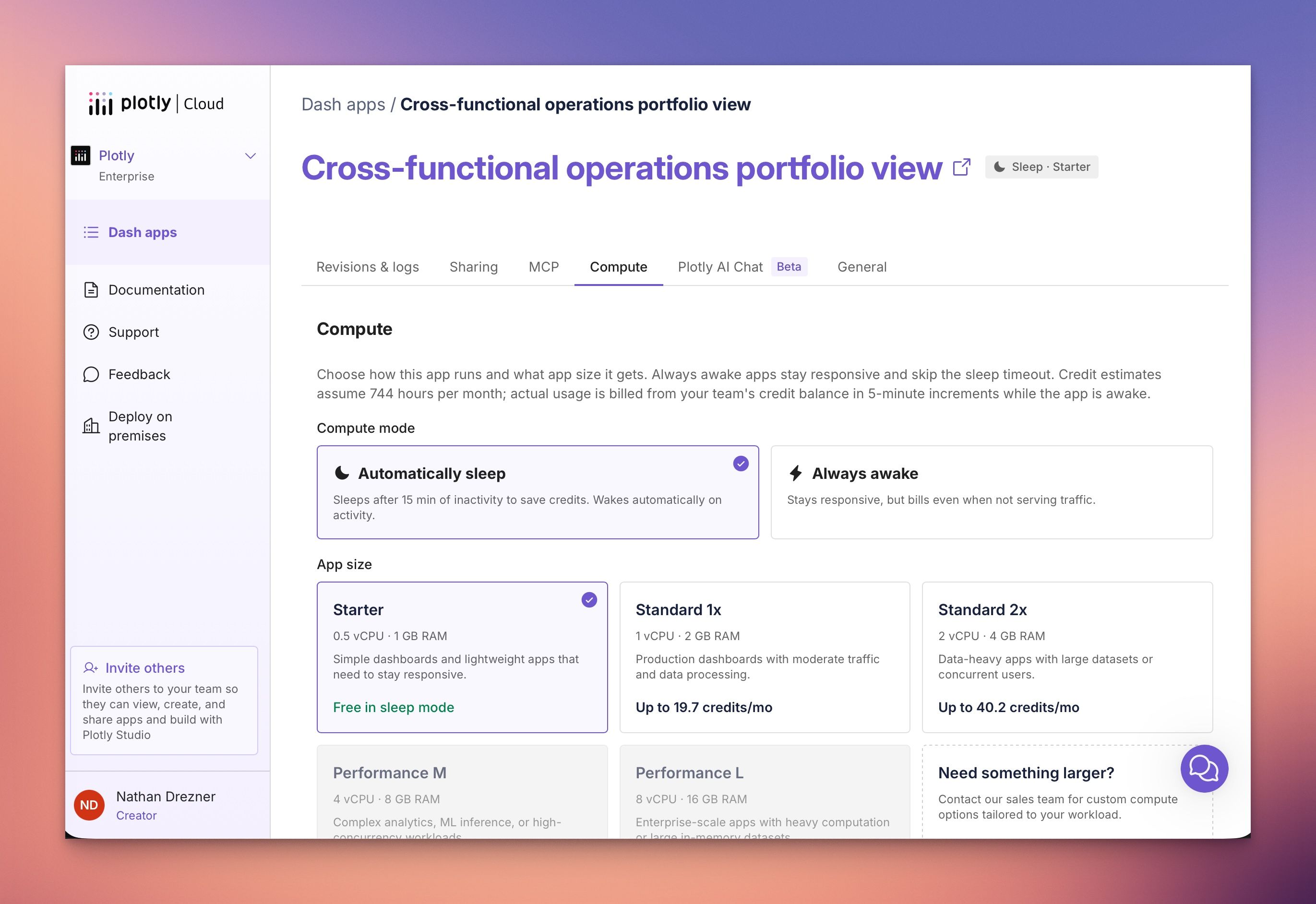
Compute modes
Automatically Sleep (default): the app sleeps after 15 minutes of inactivity and wakes automatically on the next request. You only spend credits while it's awake, so it's ideal for internal or occasionally used apps. The trade-off is a 10–30 second cold start on the first request after sleeping.
Always Awake: the app stays running and responds instantly every time. Perfect for widely shared apps, embedded dashboards, or apps running scheduled background jobs.
App sizes
Pick the CPU and memory that fit your workload, from Starter (0.5 vCPU · 1 GB) up to Performance L (8 vCPU · 16 GB). Start small and scale up as traffic and data grow. The Starter size is free in Automatically Sleep mode.
Metered, credit-based billing
Compute draws from your team's shared credit balance and is metered per 5-minute window — you're only charged while the app is actually awake. A new Estimate your credit usage slider on the Compute tab lets you preview monthly cost for any mode and size before you save.
👉 Learn more in the Compute Mode and App Size documentation, or get started by visiting the Compute tab for any of your apps on Plotly Cloud.