Plotly Studio v0.0.79: Skills, Session Redesign, and Easier File Uploads

New Features
Skills
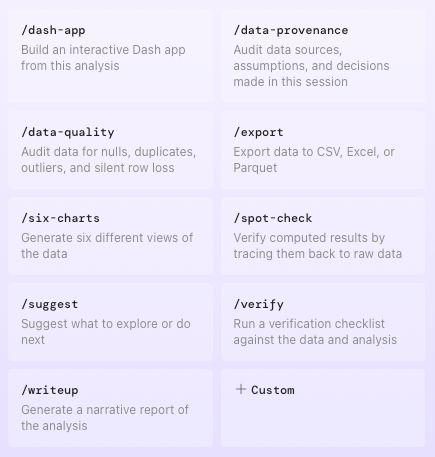
Skills are reusable prompts you run inside any agentic session to handle common tasks without retyping the same instructions. Nine built-in skills are available, and custom skills can be created additionally. Invoke any skill from the Skills panel or by typing its slash command directly in the prompt box.
Skills are great for spot checking your analysis, one-button creation for Dash apps, and even as a way to create a data source template when connecting to your data sources at the start of each session.
Start Sessions With Just a File Upload
You no longer need to write a prompt to start a session. Upload your data files and Studio will begin working from them. Session names also update automatically to reflect the names of your uploaded files.
Improvements
Redesigned session list. The session list now uses a cleaner layout that gives each session and its charts more room. The masonry grid has been replaced with a design that makes it easier to scan past work at a glance.
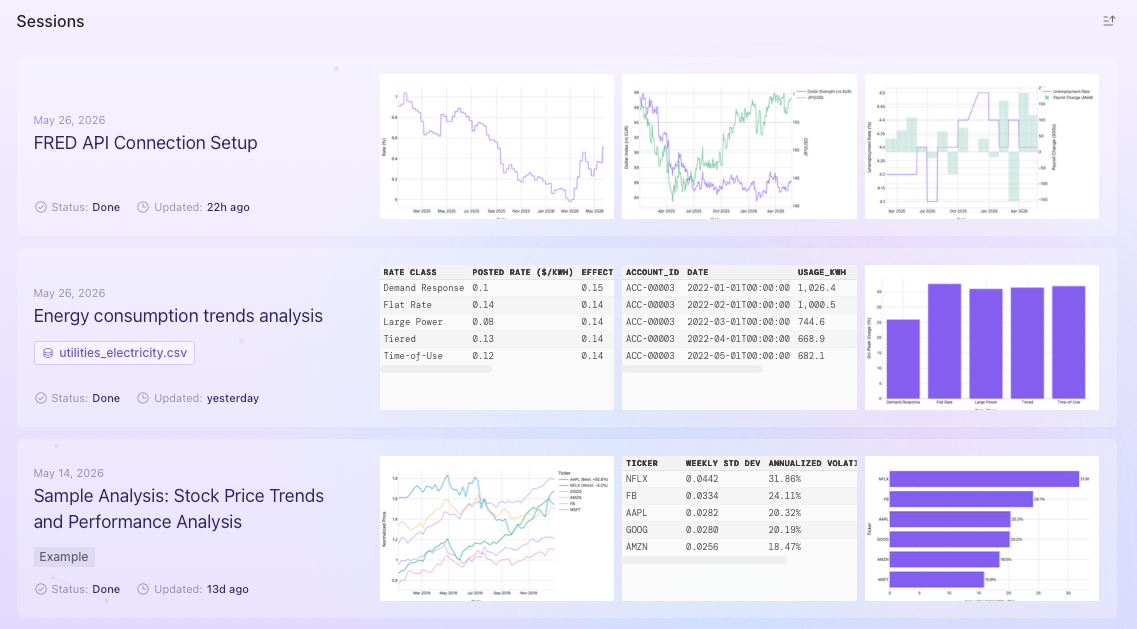
Smoother loading and startup. Loading animations in agentic mode are smoother, and startup errors now surface clear feedback instead of failing silently.
Navigation and account menu updates. The header has been reorganized and the user menu consolidates options, making team switching and account settings easier to find.
Fixes
Fixed an issue on Windows where Python processes would stay running after Studio closed, causing file locking errors on the next launch.
Fixed a bug where sessions could load stale data instead of the latest version.
Fixed spinner freezing during long operations.
Fixed an issue where Dash app code could render as plain text due to mismatched tags in the output.
Session thumbnails now show a placeholder when a chart image cannot be saved, rather than showing nothing.
Tables now match height correctly when displayed alongside charts.
Fixed terminology and interaction issues in the credential management UI.
Long prompts now collapse automatically in the input field.